
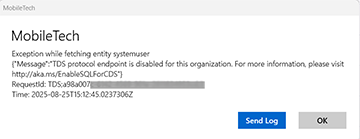
Description: When syncing MobileTech, users receive a similar error message:
Exception while fetching entity systemuser
“Message”: TDS protocol endpoint is disabled for this organization.”
Click to view screenshot
Solution: Verify that the TDS endpoint settings in WennSoft Service and MobileTech Service are set to the same, either both disabled or both enabled.
-
In WennSoft Service, access the Power Platform Admin Center, and search for “TDS Endpoint”. Verify the settings for the following options:
-
Enable TDS endpoint
-
Enable user level access control for TDS endpoint
-
-
In WennSoft MobileTech Admin, open the MobileTech Service Woodford project and select Configuration. Search for “TDS”. Verify that the 'Use TDS download method' setting is set to match the setting in WennSoft Service. The default value is False (or disabled). When set to True (or enabled), you are using the TDS download method.
The Tabular Data Stream (TDS) endpoint is a feature provided by Microsoft Dataverse that emulates a SQL data connection. This endpoint allows users to execute SQL queries against the Dataverse data tables, providing read-only access to the table data of the target Dataverse environment. For more information, see https://learn.microsoft.com/en-us/power-apps/developer/data-platform/dataverse-sql-query.