Appointment panel labels and tooltip labels are defined in a similar manner using JSON files. These files are in: Install location\Schedule\WebsiteFiles\Scripts\K2A\SchedulerControl folder.
The files are:
-
eventContent.json : Appointment panel labels
-
tooltipContent.json : Appointment tooltip labels
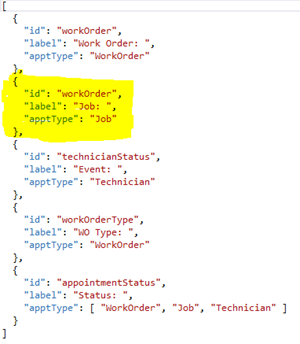
Below is an example of the file structure. Each section within the curly brackets { } represents an appointment property that you will see on the schedule board. The order that your fields appear in the configuration file is the order that they will show in on the schedule board.
-
"id": Appointment property and must be one of these valid case-sensitive values: Appointment Property List .
-
"label": User-defined label that displays for the property.
-
"apptType": Appointment type to display the label for. The available appointment types are: "WorkOrder", "Job", and "Technician".
Examples:
-
Adding Appointment Description to Mouse-Over Tooltip -
Adding Cost Code Alias to the Tooltip or Job Appointment Bar -
Adding Service Call Description with a Label -
Adding Service Call Description Without a Label -
Example: Appointment Property List -
Example: Additional User-Defined Fields -
Altering the Resource Data Shown in the Timeline View