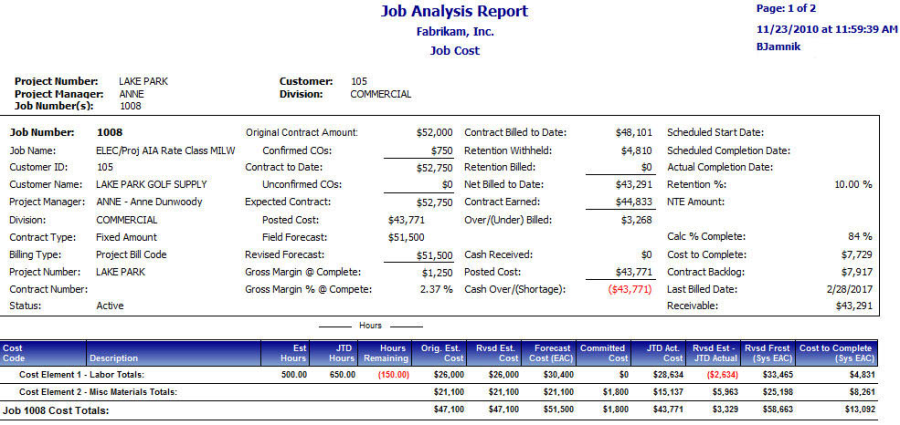
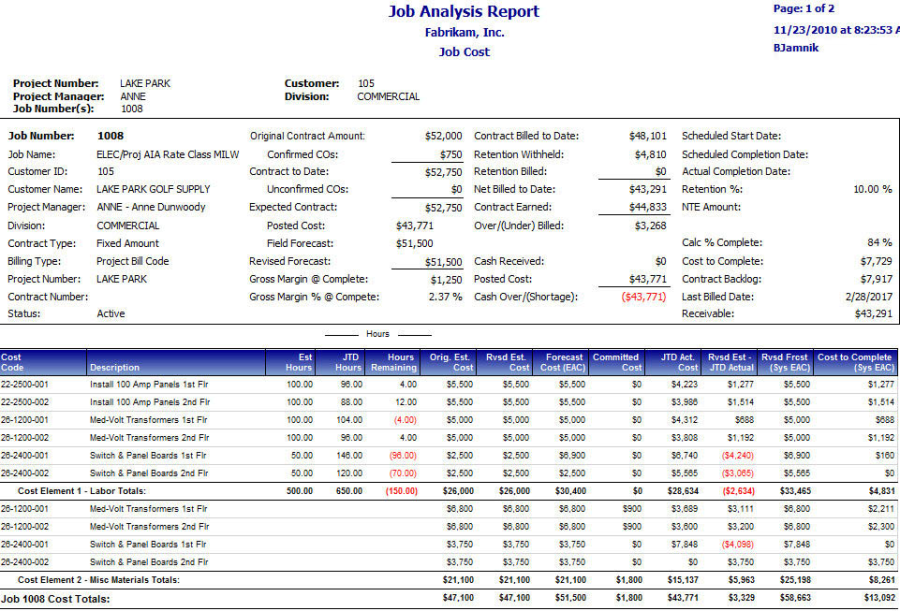
This report allows you to analyze job information such as hours, costs, estimates, forecasts, and cost to complete. You can print a summary of job totals and subtotals per cost element, or you can print the detailed version of this report, which analyzes totals for each cost code. Select a value in the Project drop-down to enable the Job selection field and filter the jobs that display in the drop-down list. A blank selection in the Project filter displays all jobs, while choosing All projects filters out any job that is not assigned to a project, and displays all project-related jobs. Selecting a project allows you to select from the jobs assigned to that project. The job selection menu can also be filtered by customer, division, and/or project manager. You can select a single job, multiple jobs, or all jobs from the Job filter.
Summary