Skip table of contents

What's New

See PDF Downloads for a downloadable version.

Release Version: 2025 (18.8.10g008)
Release Date: Fall 2025

The following new features have been added to Signature:

Service Management

Case #

Description

SIG-233

Refrigerant tracking has been updated to comply with the American Innovation and Manufacturing (AIM) Act’s 2026 reporting requirements. The AIM Act brings major changes to refrigerant management. Businesses must meet new regulatory requirements for tracking, reporting, and leak detection by January 1, 2026. See Refrigerant Tracking.

  • Systems with 15 pounds or more of high‑GWP refrigerant must follow stringent leak repair timelines beginning in 2026 ICC+8Thalo Labs+8Grasshopper Heating, Cooling & Plumbing+8.
    We’ve added four new refrigerant equipment types:

    • 7 - Small Appliance < 15 pounds

    • 8 - Mid-Size Appliance 15 to 50 pounds

    • 9 - Commercial Refrigeration >= 1,500 pounds (GWP > 53)

    • 10 - Industrial Process Refrigeration >= 1,500 pounds (GWP > 53)

    • We’ve removed the 6 - Mid-Size Appliance 5 to 50 pounds refrigerant tracking type from the drop-down selection, as it is no longer exempt in 2026. Equipment records that are currently using this option are permitted to continue using it.

  • Automatic Leak Detection (ALD) systems become mandatory:
    Systems with 1,500 pounds (or more) of high-GWP refrigerant will need to have Automatic Leak Detection (ALD) system installed by January 1, 2026 for new systems, and by January 1, 2027 for existing systems. Any equipment that falls in the >= 1,500 pounds of refrigerant will need to be re-categorized. Leak rate calculations have not changed for Commercial (20%) and Industrial (30%) systems.

    • For new installations on or after January 1, 2026—immediately upon or within 30 days of equipment installation.

    • For existing systems installed between 2017 and 2025—by January 1, 2027.
      We’ve added an Automatic Leak Detection Installed checkbox on the equipment record’s Additional Fields window. See Working With Equipment Records.

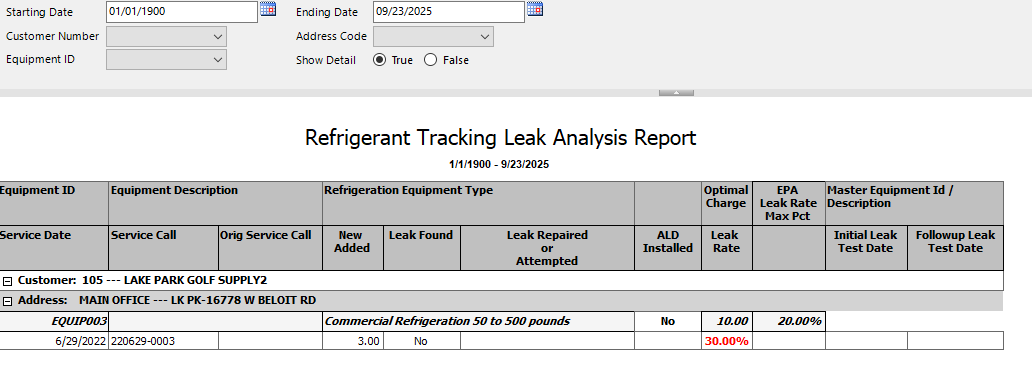
  • The Refrigerant Tracking Leak Rate Analysis Report has been updated. You will need to deploy this report to see the updated version. For information on deploying the report, see Signature SSRS Reports Setup.

Click to view report screenshot.
refrigerant tracking report.png

SMS-2797

We’ve added a Mass Transfer Service Costs to Job utility window. Use the Mass Transfer Costs to Job window to filter the completed service calls that are not the MC or MCC call type and are assigned to Job Cost jobs. Instead of having to go into each service call to transfer the costs or billing to a job, you can select several service calls at once, which will create a General Ledger journal entry for each service call, then close the service call. For more information, see Mass Transfer Service Costs to Job.

SMS-3365

We’ve updated Certified Payroll reports to work with Service Calls. See Certified Payroll.
In Invoice Setup Options, mark Certified Payroll in the Payroll Posting Options section. See Choosing Posting Options. Marking this checkbox enables the Certified Payroll checkbox on the Location and Service Call windows. See Working With Location Records and Creating Service Calls With One Appointment.

Notes for Service Management Certified Payroll

  • IMPORTANT: Certified Payroll transactions for Service must be run through TimeTrack. TimeTrack history should always be turned on. Using Dynamics GP Payroll for Service transactions will NOT include any Certified payroll functionality.

  • The Maintenance Contract window does not have the Certified Payroll checkbox, but if the location has Certified Payroll marked, and you have a contract at that location, the creation of PM Tasking (Service Calls) from the contract will take the location flag when creating the calls.

  • WS Utilities Import feature for service calls is NOT updated to create the calls from the import. You will have to go to the calls you want Certified and mark them manually.

  • WS Integration Manager (SmartConnect imports) and its Service Call import was NOT updated to include the Certified flag. However, if the location has the Certified Marked, then the imported call will have it also marked.

  • You will need to deploy this report to see the updated version. For information on deploying the report, see Signature SSRS Reports Setup.

Job Cost

Case #

Description

JC-190

We’ve updated the American Institute of Architects (AIA) billing report to include a percentage total on Column G (last page).

Time Sync2Core

Case #

Description

SIG-141

We’ve updated the .NET version in Sync2Core to 9.0.

JavaScript errors detected

Please note, these errors can depend on your browser setup.

If this problem persists, please contact our support.