Symbols and Buttons
The following symbols and buttons are used in windows throughout Service Management, Job Cost, TimeTrack, and Equipment Management.
|
Symbol/Button |
Description |
|---|---|
|
|
Account Analysis
|
|
|
Appointment History
|
|
|
Arrows
|
|
|
Attached Image
Use the Attached Image button to attach documents to a record. If a record has attached documents, the button shows a paper clip attached to a piece of paper. If the record does not have attached documents, the button shows a paper clip. Document examples include purchase orders, diagrams, or job change orders. Bitmap file format (.BMP) is required unless you have purchased the Advanced Document Management feature. This feature allows numerous file formats (e.g., .DOC, .XLS, .TIF) to be attached. |
|
|
Best Technician
|
|
|
Browse (or VCR)
|
|
|
Camera
|
|
|
Ellipsis
|
|
|
Eraser
|
|
|
Expansion
|
|
|
Folder
|
|
|
Go
|
|
|
Go To
|
|
|
Hyperlink (zoom)
|
|
|
Item Information
|
|
|
Link
|
|
|
Lookup
|
|
|
New Call
|
|
|
Next Available
|
|
|
Notepad
|
|
|
Organization Structure
|
|
|
Password Padlock
|
|
|
Phone
|
|
|
Print
|
|
|
Print
|
|
|
Query
|
|
|
Redisplay
|
|
|
Show/Hide Detail
|
|
|
Technician Schedules
|
|
|
Tree View
|







Indicators
Visual indicators are linked to the customer ID and location. Not all indicators may be visible because they are dependent upon your system's initial setup.
|
Indicator |
Description |
|---|---|
|
|
Branch
|
|
|
Canceled Contract
|
|
|
Closed Contract
|
|
|
Contract
|
|
|
Expired Contract
|
|
|
Master Contract
|
|
|
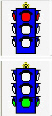
Stop-and-go light
|
|
|
History
|
|
|
Quote
|
|
|
Overdue
|
|
|
Service Level Agreement (SLA)
|
|
|
Warranty
|
|
|
Has Components
|
|
|
Component
|
|
|
Item
|
|
|
Group
|
|
|
Group Item
|
|
|
Project Contract Status
|
|
|
Project Billed Position
|
|
|
Stop-and-Go Light
|