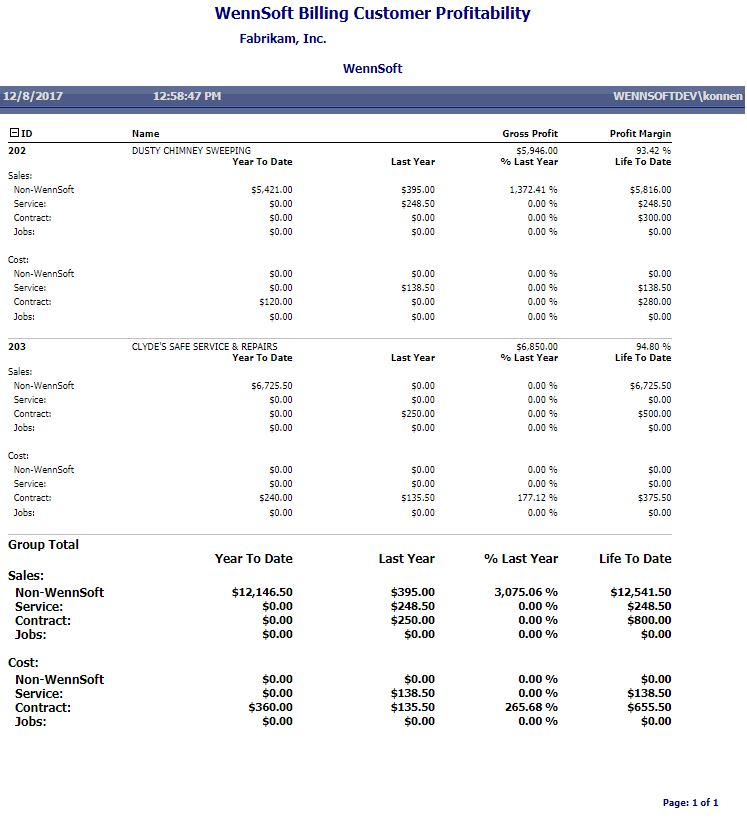
This report allows you to view a customer's true profitability, regardless of whether sales or costs are attributed to a Signature or a GP module. You can also use this report to track profitability by product, with year to date, life to date, and last year's totals broken down and summarized per job, service call, maintenance contract, or non-Signature transactions.
Costs for jobs are only available on this report for posted periods. Current Job Cost transactions do not appear on this report.
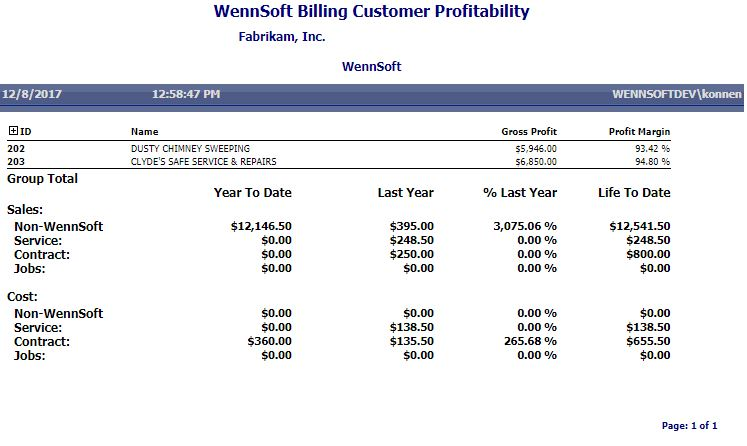
Choose whether to view information by fiscal year or calendar year, then select the year and a period range. Choose a customer ID range and sort option; you can sort profitability information for each customer by customer ID or name, class, salesperson, sales territory, or state. You can also filter the report per a customer name, class, salesperson, territory, state, or user-defined field range. The summary version of this report prints by default, allowing you to view and profit margin totals for each customer. You can use the expansion button next to the ID field label to show detailed profitability for each customer by product.
Summary
Detail