The Time Entry Audit report contains audit data for every timesheet submitted during the specified period. Administrators (Time Admin, Payroll Admin, or a Super User) can download the Time Entry Audit Report as a Microsoft Excel spreadsheet file (.xlxs). All time entries on the report are based on the user’s browser time zone.
This report includes the following information:
-
Employee ID
-
Employee First Name
-
Employee Last Name
-
Transaction Date: The date the transaction was created.
-
Audit Transaction Date: The date the transaction was inserted or updated. This date may have been updated.
-
Operation: Indicates transaction operation (for example, Insert indicates when the transaction was inserted).
-
Active State
-
Status
-
Last Modified By
-
Emp Acknowledge Date
-
Time In And Transaction ID Sort Field
-
Transaction Time In: Actual time in on the timesheet.
-
Transaction Time Out: Actual time out on the timesheet.
-
Audit Time In: May be different if the time in was updated.
-
Audit Time Out: May be different if the time out was updated.
-
Hours
-
Company Name
-
Transaction Type
-
Tech Activity
-
Job Number
-
Job Description
-
Cost Code Job Alias
-
Cost Code Job Description
-
Service Call Number
-
Service Call Description
-
Cost Code Service Call Alias
-
Cost Code Service Call Description
-
Pay Code
-
Cost Type
-
Status Comment
-
Note Text
-
Insert Timestamp: The time the record was inserted.
-
Last Modified Timestamp: The time the record may have been adjusted.
-
Shift Code
-
Audit Time Stamp: The time the audit was created in the audit table. This may be milliseconds different than the Last Modified.
-
Time Zone
To generate the Time Entry Audit Report:
-
In Time, select Reports.
-
Select Time Entry Audit Report.
-
Enter the Start and End Payroll Dates.
-
Select Generate.
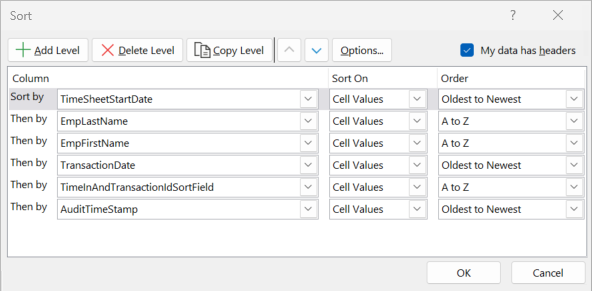
Click to view Excel spreadsheet sort order.